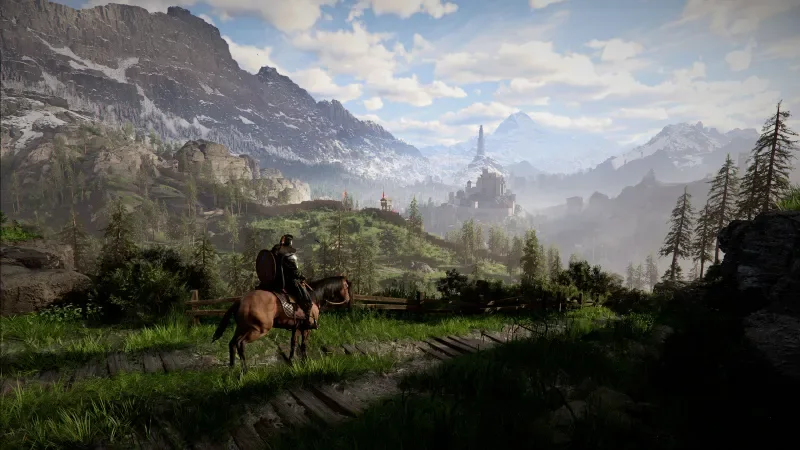
Crimson Desert Update: PS5 Pro and Xbox Series X Performance and Resolution Analysis

Latest Update: Earlier today, developer Pearl Abyss deployed a comprehensive update for Crimson Desert, rolling out first for PC followed by PlayStation and Xbox consoles. With the patch now live across all ecosystems, we returned to the console builds to determine if the technical refinements have tangibly improved the player experience.
While we are still evaluating the PlayStation 5 version, our initial testing on Xbox Series X confirms a noticeably more fluid experience. To borrow a phrase from the famously vague Breath of the Wild patch notes, the game simply feels “more pleasant.”
The update hasn’t radically overhauled the visual fidelity—character beards and fine textures still lack some polish—but the responsiveness of the protagonist, Kliff, is significantly improved. Combat maneuvers, specifically parrying and countering, feel much tighter, and navigating the UI is far more efficient. While Kliff still possesses a deliberate sense of weight that some might find “heavy,” it now feels like an intentional design choice rather than a result of technical lag.
Crimson Desert stands as one of 2026’s most ambitious releases, finally arriving on PlayStation 5, Xbox Series X/S, and PC. While our full review explores the narrative and world-building of this massive RPG, we wanted to take a granular look at how the title scales across console hardware.
Unsurprisingly, high-end PC remains the definitive platform for Crimson Desert. Players with robust rigs can push the visual settings to staggering heights, and the game’s broad optimization ensures even older hardware remains viable. Consoles, however, offer a more “plug-and-play” promise, though they currently require some specific settings to reach their full potential.
PlayStation 5 Pro: Performance vs. Fidelity
On the PS5 Pro, players are presented with three distinct graphical profiles. To summarize the trade-offs:
- Performance Mode: Targets 1080p at 60 FPS.
- Balanced Mode: Targets 1440p at 40 FPS.
- Quality Mode: Targets Native 4K at 30 FPS.
During our testing, Variable Refresh Rate (VRR) proved to be an absolute necessity. Without VRR enabled, screen tearing was rampant across both Performance and Balanced modes, even in less demanding environments. If your display supports it, keeping VRR active is the only way to ensure a clean image.

Visual artifacts, specifically aggressive asset pop-in, remain a hurdle. In Performance and Balanced modes, foliage and terrain geometry often “morph” into view as you approach, which can be quite immersion-breaking. Quality Mode virtually eliminates these issues, but the 30 FPS cap may feel restrictive for a fast-paced action game. While the frame rates are relatively stable in the opening hours, reports suggest they may dip in dense metropolitan areas or during large-scale skirmishes.

Ultimately, there is no “perfect” setting yet. Players must choose between the crisp stability of Quality Mode or the smoother, albeit blurrier and more artifact-prone, high-frame-rate options.

Xbox Series X: A Sense of Scale and Weight
The Xbox Series X version mirrors many of the strengths and weaknesses found on the PS5 Pro. Visual parity between the two platforms is high, though the Xbox build presented its own unique quirks during our initial pre-patch playtime.
While screen tearing was less prevalent than on the PlayStation side, the input latency was more pronounced. Before the recent update, there was a palpable delay between button presses and on-screen actions. This turned complex combat encounters into more of a “spam and pray” affair rather than a tactical engagement. Additionally, certain textures—most notably hair and fur—appeared strangely fractured in Performance mode.

However, when the game world is viewed statically, it is undeniably breathtaking. The draw distances are massive, and once the assets fully load, the sense of scale is industry-leading. Pearl Abyss is clearly committed to rapid post-launch support, and we expect the console versions to reach a much higher level of polish in the coming weeks. For now, if you have the hardware, PC remains the most consistent way to explore the world of Pywel.
Related articles
 rtsDimon Releases New Dust Front RTS Demo
 Nekome: Nazi Hunter Director On Whether The Game Is Political, Art Inspiration, Metaphysical Themes, Steam Demo, And More
 GTA 6 Developer Discusses Game Delays and New Studio Focused on NPC Creation
 X-Files Officially Returning With New Series
 House House Opted Out of Xbox Launch in Support of Palestinian-Led BDS Boycott Against Microsoft Games
 The Last Guardian Runs on PC Without Emulation at 60 to 75 FPS
 Hit Indie Co-Op Climbing Game ‘Peak’ Launches On Consoles This Month
 Total War: Shogun 2 Complete Edition Receives Overwhelmingly Negative Reviews on Steam