
Warships of the Pacific Mod Update
Attention, Commanders!
To coincide with the launch of Warships of the Pacific, we have introduced several refinements to the model selector within the equipment and division designers as part of the latest free update. These enhancements involve structural changes to 3D model camera settings. If your mod currently overrides these camera parameters, you will need to perform some minor adjustments to maintain compatibility. This guide is designed to walk you through the necessary updates.
Who is affected by these changes?
This update is relevant only for developers whose mods modify the camera setting files for designers (based on game version 1.17.4), specifically those found within the hoi4/game/gfx/3dviewenv/ directory:
equipment_editor_small_portrait.txtequipment_editor.txtplane_designer_3d_preview.txttank_designer_3d_preview.txttemplate_editor.txttemplate_small_portrait.txt
What happens if I don’t update?
If these files are not updated, the game will ignore your custom modded camera settings and default to the native configurations introduced in version 1.17.5.0.
Step-by-Step Update Instructions
To preserve your custom 3D model perspectives, you must transfer your camera settings to a set of new files. These files are located in the same directory (hoi4/game/gfx/3dviewenv/) and follow a standardized naming convention:
- Division Designer:
division_designer_model.txtdivision_designer_model_preview.txtdivision_designer_model_list.txt
- Aircraft Designer:
plane_designer_model.txtplane_designer_model_preview.txtplane_designer_model_list.txt
- Ship Designer:
ship_designer_model.txtship_designer_model_preview.txtship_designer_model_list.txt
- Tank Designer:
tank_designer_model.txttank_designer_model_preview.txttank_designer_model_list.txt
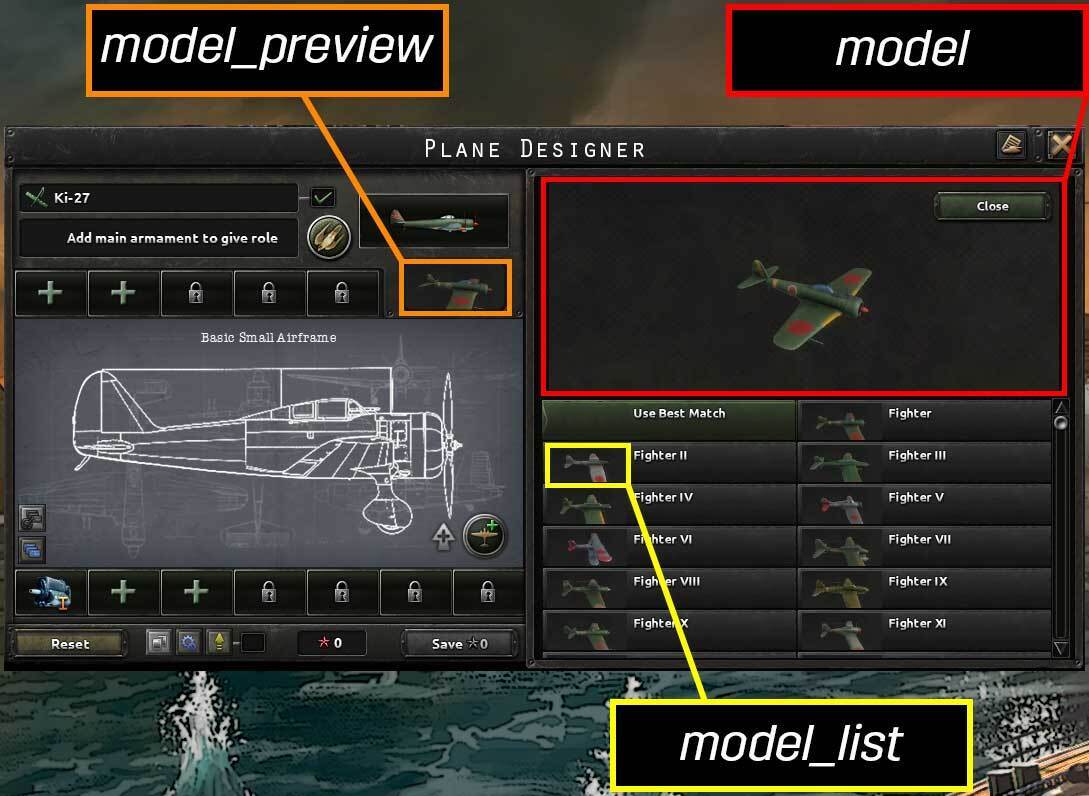
The prefix of the filename indicates the specific designer, while the suffix defines the specific UI view where the camera setting is applied. Using the aircraft designer as an example, here is how the three distinct 3D views are categorized:
- model: The primary, large-scale view located inside the model selector.
- model_preview: The initial preview window that a player interacts with to open the selector.
- model_list: The individual thumbnails visible within the selection list.
Related articles
 HOI IV Developer Diary | Romania: A Flawed Democracy
 Developer Corner & Open Beta: Energy #2
 Hearts of Iron IV Dev Corner | Strikes!
 Hearts of Iron IV Dev Corner: Old Canada Questions Before New Canada
 Hearts of Iron IV Dev Corner | Energy
 Steam Autumn Sale 2026
 HOI IV Dev Corner | The Great Depression
 Hearts of Iron IV | Patch 1.19.3