
Update: August 26, 2019
Movie Maker: Sequence Consolidation from Track Lists
Managing extensive scene recordings with high track counts can quickly clutter cinematic timelines. To streamline this workflow, you can now seamlessly group selected tracks into nested sequences directly via the tracklist context menu.
Movie Maker: Overhauled Undo/Redo Architecture
Historical undo and redo operations (Ctrl+Z / Ctrl+Y) within the timeline previously suffered from inconsistency, risking lost progress. The system has been completely restructured: keyframe modifications now serialize reliably into the undo stack, and execution commands prioritize the Movie Maker interface even when the primary scene viewport retains focus—provided the scene contains no newer edits.
Surface Snapping & Ground Tracing for the Transform Gizmo
The central handle of the translation gizmo has been re-engineered. Rather than performing planar movement across screen space, dragging the center handle now casts a ray directly onto geometry beneath the cursor. The object’s origin dynamically snaps to the nearest intersected collision surface.
Additionally, holding Alt while translating automatically aligns the entity’s orientation to the surface normal of the targeted terrain or mesh:
Unified Model Assembly from Multi-Mesh Selections
In addition to generating individual .vmdl assets from discrete files, the asset pipeline now supports compiling multi-mesh selections into a single, unified model. The importer automatically configures level-of-detail (LOD) hierarchies and collision hulls, eliminating the need to combine geometry in external DCC packages prior to export.
To leverage automated channel mapping, adopt the following file naming conventions:
- _lodX — Level of Detail meshes (where X designates the LOD index)
- _col — Mesh-based collision hulls
- _hull — Simplified convex collision volumes
- Unsuffixed / Standard — Automatically assigned as standard render geometry within ModelDoc
Cloud Asset Pipeline Robustness
A series of targeted fixes have been deployed to eliminate race conditions and compile errors when retrieving cloud assets:
- Synchronous Dependency Staging: Assets and their prerequisite dependencies are now completely downloaded and validated prior to staging, preventing premature asset load failures.
- Redundant Compilation Safeguards: Resolved an initialization anomaly where the editor attempted to recompile source-less cloud assets upon startup, preventing environment corruption.
Transition from VPC to Native C# Project Generation
Valve Project Creator (VPC) has been deprecated in favor of an in-house, C#-based build tool. Project modules are now defined via modular .build.cs files, aligning our architecture with contemporary patterns such as Sharpmake and Unreal Build Tool.
This modernization removes legacy third-party dependencies, prepares our native C++ codebase for future open-source availability, accelerates cross-platform compatibility, and consolidates build, content baking, and packaging into a unified toolchain.

Automated Dependency Management
Third-party headers and precompiled binaries have been decoupled from the primary Git repository. Dependencies are now retrieved on-demand via automated package scripts rather than being committed to version control, substantially reducing repository size and accelerating cross-platform maintenance.

The build definitions for these external packages are publicly available on GitHub:
View Open-Source Dependency Build Scripts
Multi-Camera Terrain Frustum Culling
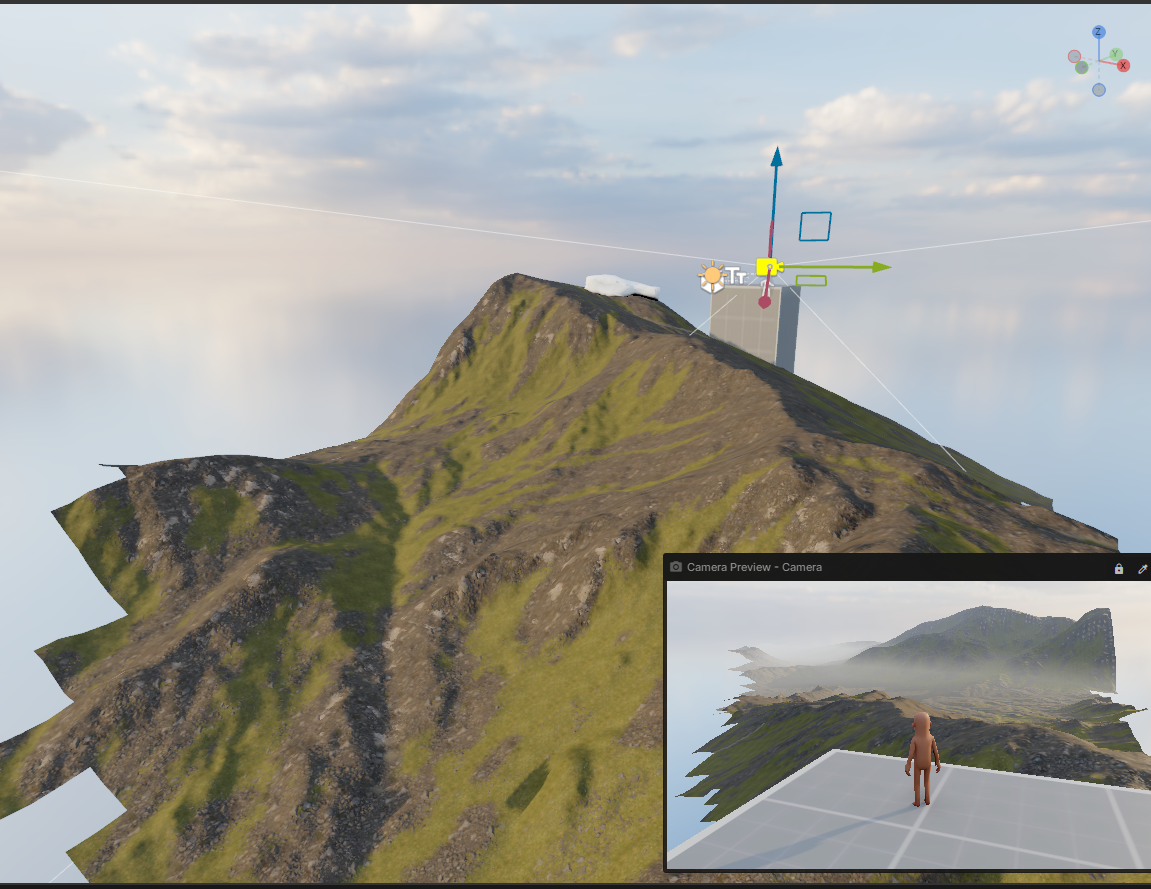
Terrain culling was previously coupled to the primary rendering perspective, resulting in meshlet visibility conflicts and accidental culling across secondary cameras. Terrain meshlets are now independently culled for every active viewport based on its discrete camera position and frustum, while simultaneously resolving a one-frame synchronization latency.
Advanced Performance Diagnostic Overlays
The diagnostic command overlay_fps has been expanded to provide deeper performance telemetry. Alongside frametime graphs, the interface now monitors GPU execution time, 1% low metrics, critical pipeline stage delays, active display parameters, and identifies throttling sources across fps_max, fps_max_menu, fps_max_inactive, or VSync.
View Diagnostic Overlay Demonstration
Additionally, overlay_fps 2 introduces a linear diagnostic sweep across the viewport once per second (rendered as discrete blocks per frame), offering an immediate visual method to detect frame-pacing irregularities and micro-stuttering.
 Neck and Neck
 Update 26.09.15
 Update 26.09.08
 Update 26.09.01
 Update 26.08.05
 Update July 26, 2022
 Update July 26, 2015