
List of All Active Neverness to Everness Codes
Using Neverness to Everness codes is a fantastic way to streamline your journey, providing essential progression materials and resources to help elevate your characters. While developer Hotta Studio launched the game with a generous batch of these gifts, they don’t follow a fixed release schedule. Much like the studio’s other title, Tower of Fantasy, players can generally look forward to a fresh wave of rewards every few months.
Below, we have compiled a comprehensive list of all currently active Neverness to Everness codes, along with instructions on how to redeem them and a breakdown of the loot you’ll receive.
Complete List of Neverness to Everness Codes
At launch, Neverness to Everness arrived with six promotional codes containing a variety of useful items, including Annulith (the premium currency for summoning), essential leveling resources, and Beetle Coins—the primary in-game currency. While no strict expiration dates were provided, these codes are subject to rotation and will eventually expire, so we highly recommend claiming them immediately.
Active Neverness to Everness Codes:
- NTE0429: 100 Annulith, 2 Elite Hunter Guide, 2 Chaotic Dye, 12,000 Gold Beetle Coins
- NTEGIFT: 50 Annulith, 5 Rising Hunter Guide, 5 Light Dye
- NTEHAVEFUN: 3 Rising Hunter Guide, 3 Light Dye, 3 Manhole Thug
- NTENOWTOENJOY: 100 Annulith, 5 Rising Hunter Guide, 5 Light Dye, 4,000 Gold Beetle Coins
- NTENANALLYGO: 100 Annulith, 5 Senior Hunter Guide, 5 Colorless Dye, 6,000 Gold Beetle Coins
- 504980102FKGOVNS: 20,000 Gold Beetle Coins, 1 Gubichin Original Flavor Chips, 20 Annulith
How to Redeem Your Rewards
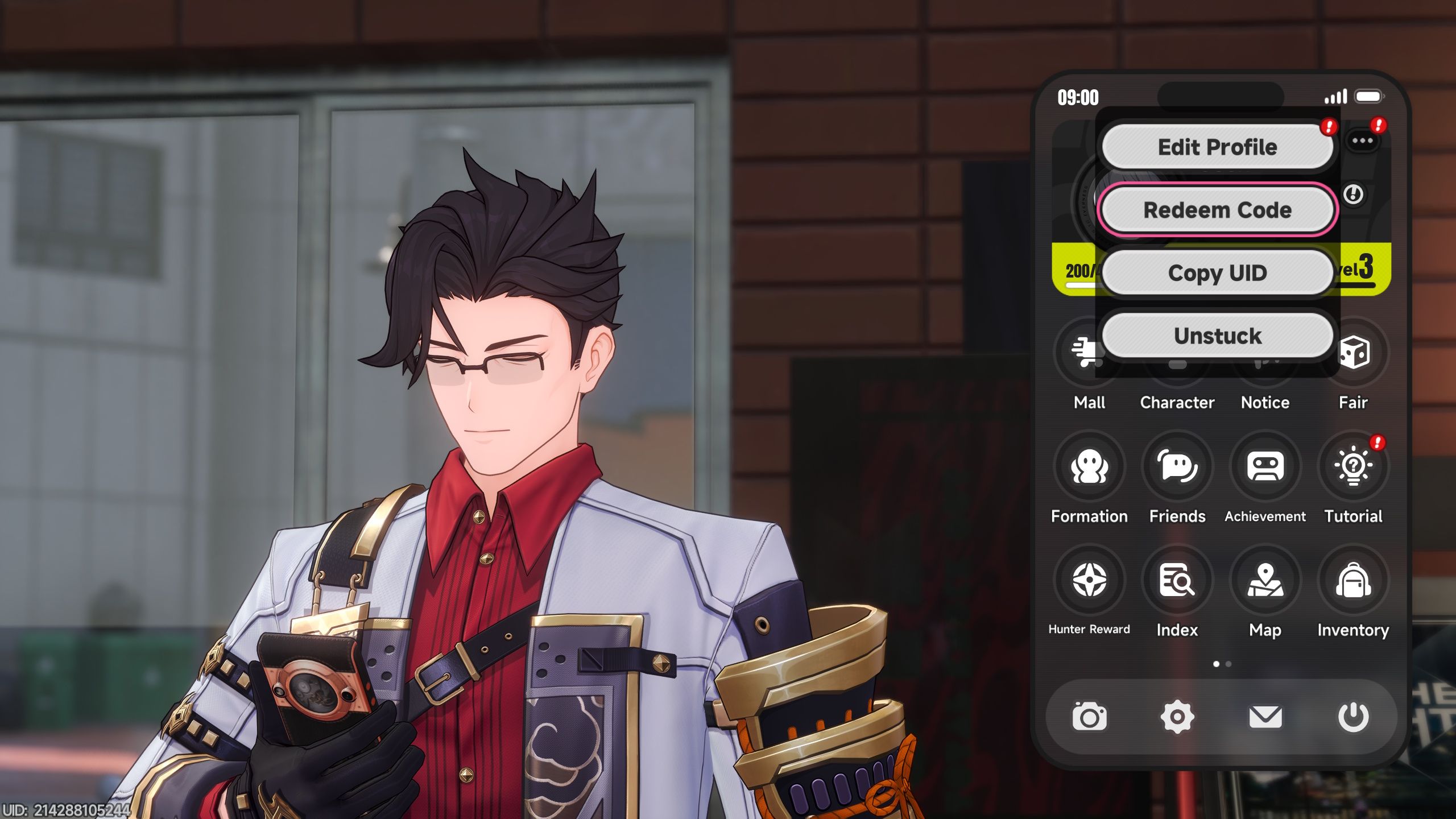
You can unlock the code redemption feature once you have successfully cleared the combat tutorial. Depending on your pace, this typically takes about an hour of gameplay. Once you reach the vicinity of the Eibon Antique Shop, you gain full access to the city and the system menus, which house the gacha banners and the code redemption interface.
Steps to claim your rewards:
- Access your main game menu.
- Tap or click the “three dots” icon positioned beside your character’s name.
- Select the “Redeem Code” option from the list.
- Carefully enter your code and tap “Confirm.”
- Check your in-game mailbox to collect your rewards.
Source: Polygon
Related articles
 Rockstar Sends Gift to GTA VI Buyer Following Polite Request, Facing Criticism From Other Players
 Modder Restores Cut Assassin’s Creed Black Flag Resynced Scene Connecting Franchise Games
 Risk of Rain 2 Halloween DLC Enters Steam Top Sellers With Very Positive Reviews
 CDPR Releases The Witcher 3: Wild Hunt Update 5.01
 Ghost of Yotei Runs at 3.4 Frames Per Minute in PC Port
 Modder Adds Co-op and AI Partner to Resident Evil 2 Remake
 The Last of Us and Uncharted 4 Creator Admits Fear of GTA VI Release
 Why Magnum P I Remains a Defining Action Series Decades After Its Premiere