Battlefield 6 Community Update: Server Browser Coming Soon
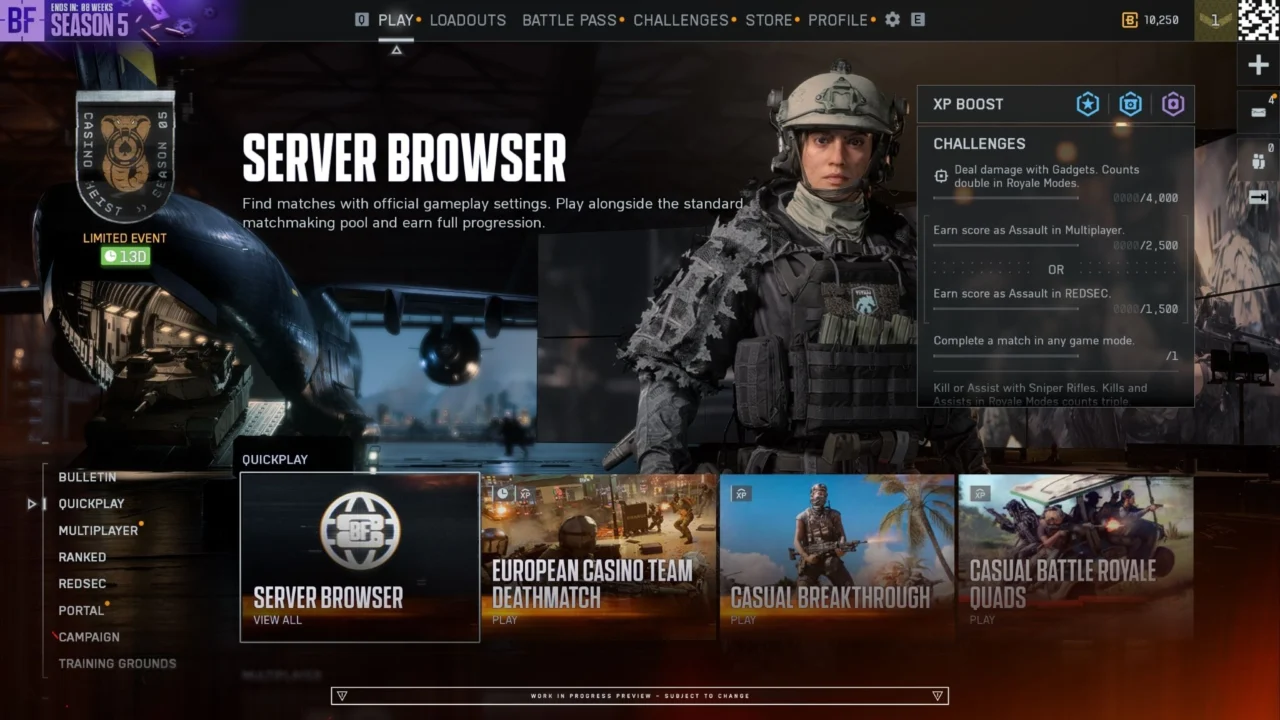
Battlefield 6’s Server Browser is arriving ahead of schedule. Originally slated for Phase 3 of Season 5, its staged rollout will now begin shortly after Phase 2 launches on November 10.
The Rollout Plan
Stability is the priority ahead of the holidays, so the Server Browser will launch in two stages. This approach will allow the team to assess server loads, queues, and matchmaking backfill under live conditions.
- Limited public scale test: Shortly after Phase 2 begins, a select group of players will gain access to the Server Browser in the live game. The team will use this period to stress-test servers, monitor queues, and assess matchmaking backfill with real squads.
- Full global launch: Once performance data has been reviewed and any necessary fixes are in place, the Server Browser will become available to players worldwide.
The rollout is expected to progress over a couple of weeks, though the timing will depend on test results and any issues that need to be addressed. Further updates will follow as the team reviews the data and prepares for worldwide availability.
Where to Find the Server Browser
The Server Browser will appear in the Quickplay row, making it easy to find as soon as you enter the game. Select it to open the Official tab and see active servers immediately. Additional Server Browser tiles will also appear in other menus, including Portal.

Core Features at Launch
- Direct access to official servers: Browse and join Battlefield Studios-hosted and official player-hosted servers from one location.
- Shared server pool: Quickplay, Multiplayer, Custom Search, and the Server Browser connect to the same pool of official servers. Matchmaking helps keep servers listed in the browser populated.
- Filtering and sorting: Filter servers by map or mode, and sort results by ping, player count, server name, or recommendation.
- Full progression and mastery: All servers in the Official tab award full XP, weapon mastery, and challenge progress, just like standard matchmaking.
- Persistent lobbies: Stay on the same server with your squad for consecutive rounds instead of returning to the main menu after each match.
Server Classifications
Servers are organized into three main browser tabs to accommodate different community experiences while protecting fair progression. Battlefield Studios-hosted and official player-hosted servers both appear under the Official tab.
| Browser Tab | Description | Matchmaking and Backfill | Progression and XP |
|---|---|---|---|
| Official (Studios) | Dedicated servers hosted and maintained by Battlefield Studios | Full matchmaking integration | Full XP and mastery progression |
| Official (Player-Hosted) | Persistent player-hosted servers using official game templates | Full matchmaking integration when running modes in the active rotation | Full XP and mastery progression |
| Verified | Community experiences created in Portal with verified presets and custom rules | Player and bot fill; direct browser joining | Full XP progression |
| Custom | Heavily modified community sandboxes and custom logic scripts in Portal | Direct browser joining and community invitations | Partial XP progression |
Existing Portal tools, rule modifiers, and admin controls remain unchanged in the Verified and Custom tabs.

How Servers Fill
Official player-hosted servers give squads a consistent place to return to. They run on dedicated servers, so the host does not need to remain in a match for the server to stay online.
These servers remain visible in the browser even when empty, allowing anyone to find and join them. However, matchmaking will not automatically populate an empty server. At least one player must join first before matchmaking can begin routing others in.
A server can remain empty for up to seven consecutive days before it is delisted. The inactivity timer resets whenever a player joins. Hosts can also shut down their server at the end of a round or when starting a new one, but simply leaving the game or logging off will not interrupt matches in progress.
For official player-hosted servers, automatic backfill depends on whether the selected mode is currently available in the main Quickplay or Multiplayer menus:
- Active menu modes: Permanent modes such as Conquest and Breakthrough, along with featured modes currently available in Quickplay or Multiplayer, receive automatic matchmaking backfill once at least one player has joined.
- Off-menu modes: You can host any supported mode even when it is not listed in the main menus. These servers rely on players finding and joining them through the Server Browser rather than automatic matchmaking. If the mode returns to the active menu rotation, matchmaking backfill will resume automatically without the server needing to be re-hosted.
How You Join Affects Your Experience
Recent backend matchmaking updates have focused on keeping matches populated and lobbies healthy while preparing for the Server Browser. Your route into a server will affect what happens between rounds:
- Server Browser: Stay on the server through its map rotation for as many rounds as you like, provided it remains healthy and active or is a persistent player-hosted server. Even single-map and 24/7 servers will move directly into the next round.
- Quickplay or Multiplayer: Standard matchmaking connects you to the same pool of official servers. If a server continuously repeats the same map and mode, players who joined through the main menu will be re-queued after the round to avoid an unintended single-map loop.
- Custom Search: Matchmaking prioritizes your selected maps and modes. If the server’s next map does not meet your criteria, you will be directed to another server that matches your filters.
Looking Ahead
The Server Browser is designed to give players more control over where, when, and with whom they play. The immediate focus is on delivering a stable browsing and hosting experience.
The team will monitor server health and community feedback as it considers future adjustments. More information on the rollout schedule, along with a complete guide to the Server Browser, will be shared soon.
For updates, visit Steam Discussions or follow BattlefieldComm on X. Report issues through the EA forums, or join the Battlefield Discord for Q&As, giveaways, community events, and help finding a squad.
This announcement may change as community feedback is reviewed and the live service and its content continue to evolve.
Related articles
 Battlefield 6 – Community Update: High Stakes at the Casino
 Battlefield 6 – Anti-Cheat Metrics – September
 Battlefield 6: Community Update on What’s Coming in Season 5
 Battlefield Community Survey – Siege of Las Vegas
 Battlefield x Dead Space Crossover Event: A Guide to the New Nightmares
 Steam Free Trial Extended!
 Live Q&A on Battlefield Discord, October 20: Siege of Vegas and Season 5
 Battlefield 6 Full Game Trial*