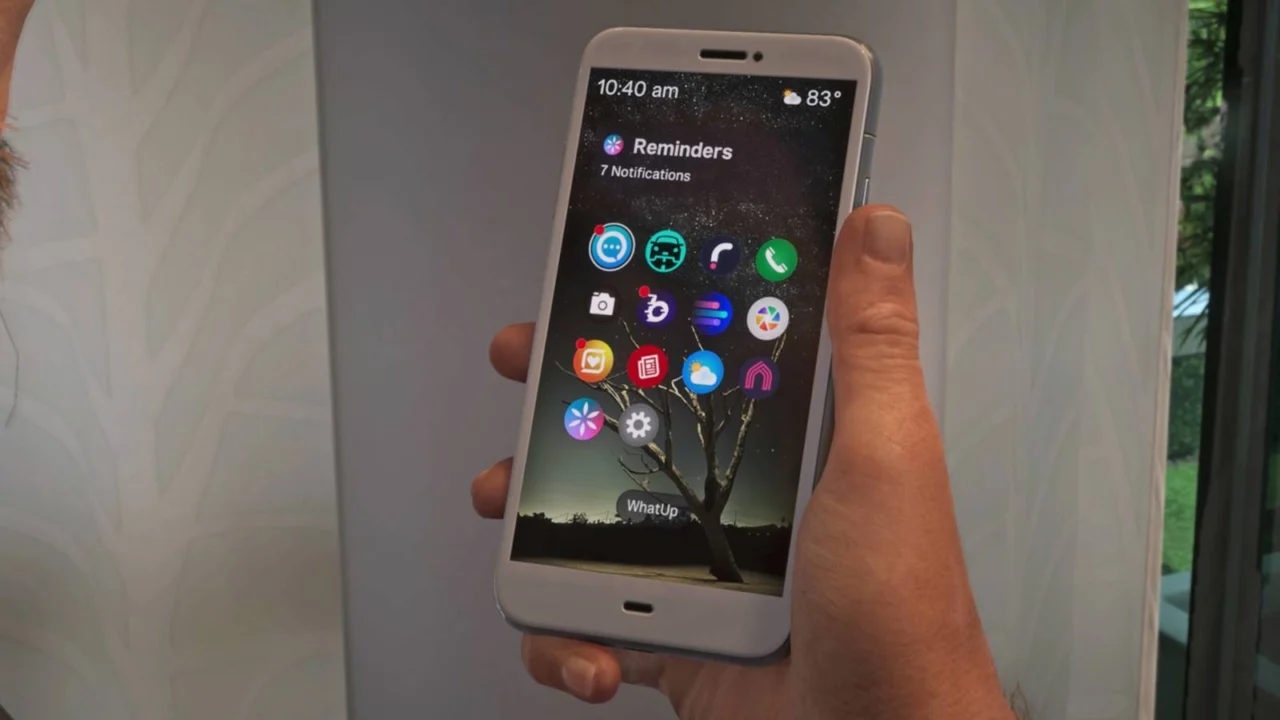
List of Phone Apps in GTA 6
Every phone app in Grand Theft Auto 6 has a role, though some are more practical than others. Scooter Bros and RydeMe can make getting around easier, while Snapmatic offers a sometimes unsettling glimpse into social media. If you want access to the full selection, you’ll need to unlock a few apps as you progress.
Here’s how to use your phone in GTA 6, along with what each app does and how to unlock it.
How to use your phone in GTA 6
Press up on the D-pad to bring out your phone. Hold the button instead to open the WAiNK vehicle scanner directly—a useful shortcut when you need to find a getaway car quickly.
Most apps become available as you advance through the main story. If an app such as RydeMe hasn’t appeared yet, keep playing until you reach its unlock point.
The table below lists every app discovered so far in the order it appears on the phone, along with its function and unlock requirements.
| App | Purpose | How to unlock |
|---|---|---|
| WhatUp | A messaging service similar to WhatsApp. | Available from the start of the game. |
| Scooter Bros | Pay to have a car or bike delivered to your location instantly. The cost rises with the distance and the amount of damage to the vehicle. | Complete Moses’ quest in Chapter 2. |
| RydeMe | A taxi service similar to Uber. Choose a destination and pay for a pickup; you can also use it to fast travel. | Unlocked during the “Buck Me!” main mission, shortly after Lucia comes home in Chapter 1. |
| Contacts | Keeps a list of phone numbers for people you’ve met. You can call most contacts, although unscheduled calls usually reach voicemail. WhatUp handles most communication. | Available from the start of the game. |
| Camera | Take selfies and send them to your partner. | Available from the start of the game. |
| BuckMe | Manage your money after depositing cash at an ATM. The checking account is used for payments, while Family Savings tracks main mission progress and cannot be withdrawn. | Unlocked during the “Buck Me!” main mission, shortly after Lucia comes home in Chapter 1. |
| Fitness | Tracks strength, cardio, and focus, which determine your character’s health, stamina, and focus stats. Work out to improve these fitness levels. | Available from the start of the game. |
| Gallery | View photos taken with your camera and images sent to you, often during missions. | Available from the start of the game. |
| Snapmatic | A social media app similar to Instagram, where friends and criminal associates share photos and updates. It has little practical use. | Available from the start of the game. |
| News | Read reports about events in and around Vice City, including crimes you may have played a part in. | Available from the start of the game. |
| Weather | Check the forecast before heading out. It’s particularly handy for activities such as fishing, which are best avoided during a storm. | Available from the start of the game. |
| Vice City Real Estate | Buy garages across Leonida to increase your vehicle storage. You cannot purchase a home through the app. | Complete Moses’ first quest in Chapter 2, then steal the ’82 Crawler for him. |
| WAiNK | Scan vehicles to identify their type and security features. Use it before stealing a car to check for an alarm or tracker. | Available from the start of the game. |
| Settings | Change your phone’s wallpaper and ringtone. | Available from the start of the game. |
Source: Polygon
Related articles
 Firaxis Games Laid Off About a Third of Its Staff Amid New XCOM Development Problems
 Sony Announces MLB The Show 27, With Technical Tests Returning After Several Years
 Parks and Recreation’s Spiritual Successor Dig Highlights Streaming’s Impact on Sitcoms
 Phasmophobia Is Moving to Unity 6 and Getting a Major Resonance Update
 Yellowjackets Season 4 Review: A Chaotic Finale on Its Own Terms
 Rockstar Explains Why GTA VI Development Took 13 Years
 NVIDIA Refused to Reinstate Jensen Huang as CEO
 Jensen Huang’s Departure Divides NVIDIA as Key Engineer Leaves Company