
Python wiz runs Superhot's menus and minigames in Command Prompt
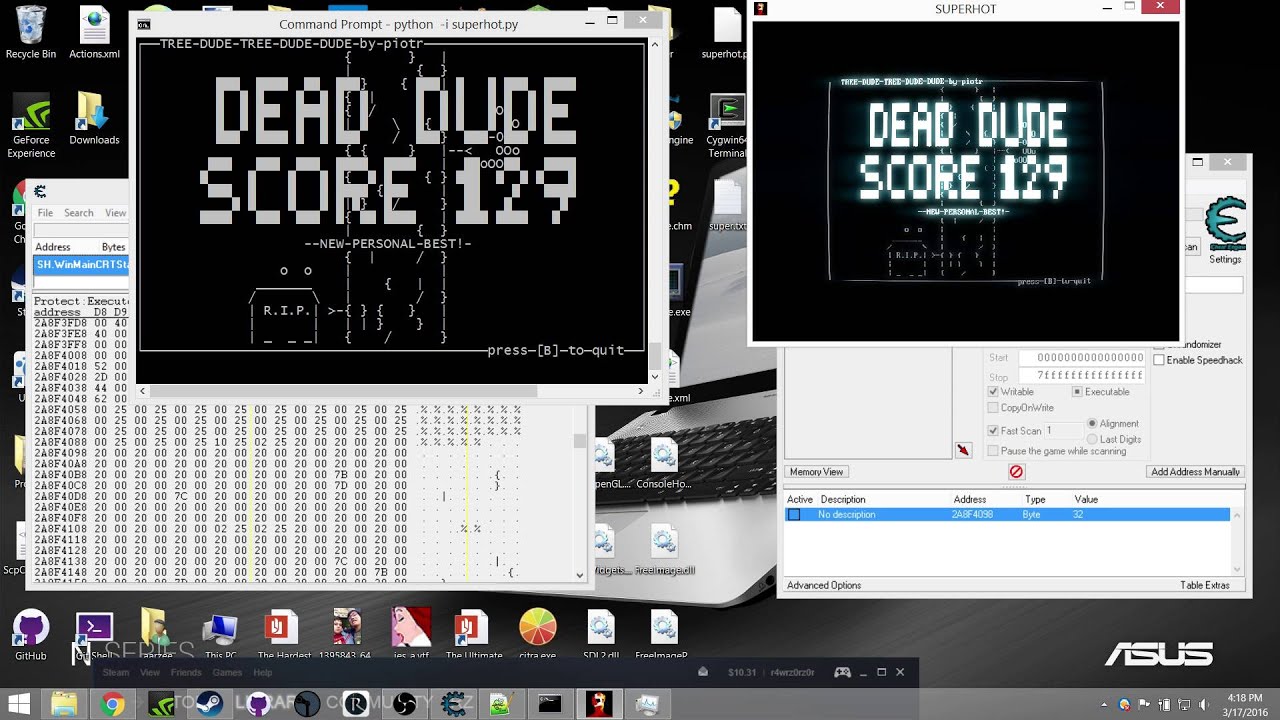
Coder and certified wizard Carlos Liam has got the menus and minigames of Superhot running in Windows Command Prompt through the magic of Python. He doesn’t discuss his motivations, but I suspect the reasoning is along the lines of “to see if I could”.
He achieved this considerable, if inexplicable, feat by sifting the memory for Superhot’s textual information. As Superhot’s minigames are all rendered in Unicode, they can be fairly well represented in real-time in Command Prompt. Command Prompt can’t display the full range of Unicode characters, however, populating some games like Mirrors with question marks instead. Colours are out of the question too, so Superhot’s red flair and blue glow are replaced by, er, white and white. That can make selecting the correct options a bit tricky.
Once Carlos has made the program easier to use he’s going to make it public, so you too can share in the joy of forcing a game into a form it was never meant to hold. And honestly, isn’t that half the business of PC gaming? Superhot in VR seems almost mundane by comparison.
Related articles
 Gameplay for Total War: Shogun 2 Complete Edition Showcased With Graphic and Control Improvements
 CDPR Advises The Witcher 3 Players Following Technical Issues With Next-Gen Update
 PlayStation 5 Emulator Runs Early Build of Marvel’s Wolverine on PC
 New Details for GTA VI Reveal Expanded Map, NPC Variety, and Weather System
 More Than 20 Games Scheduled to Release on PlayStation Store This Week
 Bandai Namco Releases Hour Zero Epilogue for Ace Combat 8
 Activision Details PC Version Features for Call of Duty: Modern Warfare 4
 Analysts Estimate Gears of War: E-Day Sold 120,000 Copies on Steam